
Printers and scanners

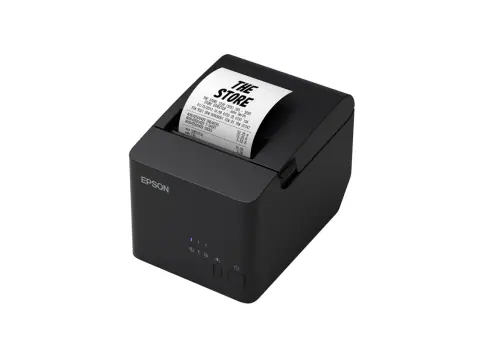
TM-T82X-461 POS receipt printer

Model TM-T82X-461

An 80 mm thermal receipt printer that prints at up to 200 mm/s at 203 x 203 dpi, with an auto cutter and a built-in power supply. This model (C31CH26461) has USB 2.0 and RS-232 serial interfaces.

Print speed
Up to 200 mm/s
Paper width
80 mm roll (79.5 mm)
Interface
USB 2.0 + RS-232 serial
Print resolution
203 x 203 dpi

Overview

Highlights

  • Thermal line printing at up to 200 mm/s on 79.5 mm roll paper
  • 203 x 203 dpi with a 72 mm print width (576 dots)
  • USB 2.0 and RS-232 serial interfaces, plus a drawer kick connector
  • Auto cutter rated at 1.5 million cuts; printer mechanism rated at 15 million lines
  • Prints bar codes and two-dimensional codes including QR Code and PDF417
  • Drop-in paper loading and a built-in power supply

At a glance

Type
Receipt printer
Used with
Toner, ink and ribbons, barcode scanners and POS and office equipment See products

Specifications

Printing

Printing method
Thermal line printing
Maximum print speed
200 mm/s (63 mm/s when printing ladder barcodes or two-dimensional symbols)
Dot density
203 x 203 dpi
Print width
72.0 mm (576 dots)
Characters per line, standard mode
Font A 48, font B 64
Cutting method
Auto cutter, partial cut (one point at the centre left uncut)
Paper type
Specified thermal paper, roll
Roll paper width
79.5 ± 0.5 mm
Roll paper diameter
Up to 83 mm
Paper thickness
48 to 80 µm
Built-in features
Automatic paper reduction, automatic paper cut with logo printing

Print characteristics

Font (W x H dots)
Font A: 12 x 24; font B: 9 x 17; Hanzi font: 24 x 24; Thai font: 9 x 24 / 12 x 24
Character size (W x H)
Font A: 1.25 x 3 mm; font B: 0.88 x 2.13 mm; Hanzi font: 3 x 3 mm; Thai font: 0.88 x 3 mm / 1.25 x 3 mm
Characters per inch
Font A: 16.9 cpi; font B: 22.6 cpi; Hanzi font: 7.8 cpi; Thai font: 22.6 cpi / 16.9 cpi
Character set
95 alphanumeric, 18 international sets, 128 x 43 pages (including Thai / Vietnamese and user-defined page); Hanzi: Simplified Chinese GB18030-2000 (28,553 characters)
Bar codes
UPC-A, UPC-E, JAN13 (EAN13), JAN8 (EAN), CODE39, ITF, CODABAR (NW-7), CODE93, CODE128, GS1-128, GS1 DataBar
Two-dimensional codes
PDF417, QR Code, MaxiCode, 2D GS1 DataBar, Composite Symbology

Connectivity

USB
USB 2.0 Full-speed (12 Mbps), type B connector
Serial
RS-232, D-Sub 9-pin (male); 2,400 to 115,200 bps
Drawer kick connector
RJ12 modular connector, 2 drives
Command system
ESC/POS
Driver supported OS
Windows, Mac, Linux

Consumables and options

External buzzer
OT-BZ20 (connects to the drawer kick connector)
Affixing tape for fixing the printer
DF-10

Memory

Receive buffer
4 KB or 45 bytes (memory switch setting)
Downloaded buffer
Approx. 12 KB (user-defined characters and downloaded images)
NV graphics data
256 KB
Downloaded graphics data
208 KB

Power

Supply voltage
AC 100 to 230 V, 50 to 60 Hz
Rated current
1.0 A
Power consumption, operating
Approx. 27.8 W
Power consumption, standby
Approx. 0.96 W
Power supply
Built-in power supply

Environment

Temperature and humidity, operating
5 to 45 °C, 10 to 90% RH
Temperature and humidity, storage
-10 to 50 °C, 10 to 90% RH (except paper)
Noise, operating
Approx. 55 dB (bystander position)

Reliability

Printer mechanism life
15 million lines
Thermal head life
100 km
Auto cutter life
1.5 million cuts
MTBF
360,000 hours
MCBF
60,000,000 lines

Physical

Dimensions (W x D x H)
149 x 192 x 140 mm
Weight
Approx. 1.5 kg (excluding roll paper)
Installation
Horizontal

Included

Standard accessories
Roll paper (1 roll, for checking operation), USB cable, AC cable, setup guide

Specifications are taken from the manufacturer's published information and may change. Confirm critical values with our sales desk before ordering.

Epson product page

Works with

Consumables for Epson printers

Check the cartridge or ribbon code against the printer model.
Barcode scanners

POS and office equipment

Support

Warranty and repairs

Warranty is as per Epson’s terms for this model. For products bought from us, call our service team with the invoice number, the model and the product’s serial number.

From Epson

Practical notes

  1. Install drivers from the brand’s official support site.
  2. Use consumables made for the printer model.

Request a quote

Share the quantity and delivery location for TM-T82X-461. Our sales desk replies with price and availability, subject to stock.
You are a (optional)

Sending opens WhatsApp with your enquiry filled in, ready to send to our sales desk.

Pairs with